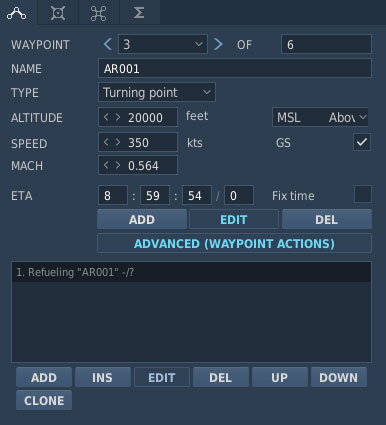
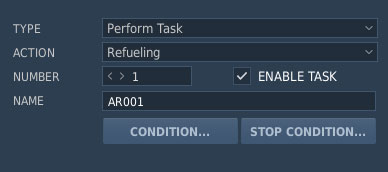
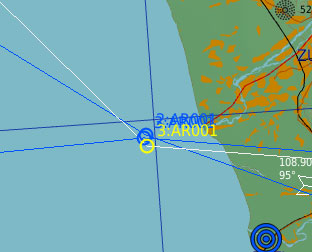
When air refueling is planned for a DCS World mission, the refueling point can be defined in the flight plan by placing a waypoint close to the tanker’s orbit or Air-to-Air Refueling (AAR) area and assigning it the same name as the corresponding tanker waypoint.
To calculate the expected air refueling time in the flight plan, set the Duration in the waypoint action Refueling. When correctly configured, DCS AOC Tools uses this information to generate the ARINFO and REFTSK lines for the mission and adds the mission to the tanker’s 5REFUEL block in the Air Tasking Order (ATO).
The tanker’s radio frequency is particularly important because it is required by the flight crew to establish communication with the tanker and request air refueling. The tanker frequency must therefore be configured in the DCS World Mission Editor and cannot be modified through the DCS AOC Tools Comm Plan.
A correctly configured air refueling mission can generate an ARINFO line such as:
ARINFO/APPLE 20/4010A/B:34010/NAME:BLUE TRACK/200/ARCT:011000Z/NDAR:011015ZOCT/KLBS:30.0/PFREQ:343.3/SFREQ:277.8/AE20/ACTYP:KC10/BOM/2/TNKR:2/18-81/2-2-4//
The corresponding refueling task can be represented by a REFTSK line such as:
REFTSK/CDT/KLBS:50.0/KLBS:20.0/PFREQ:323.3/SFREQ:242.8/29-92/3-3-4//
The mission is also added to the tanker’s 5REFUEL block:
5REFUEL//MSNNO /RECCS /NO/ACTYPE /OFLD /ARCT /SEQ /TYP /ARS/205/UZI1/2/F-16C_50/-/280454ZOCT/-/-/-/206/-1/2/F/A-18C/-/280459ZOCT/-/-/-//