
A custom aircraft callsign can be configured in the DCS World Mission Editor for each aircraft group. DCS AOC Tools reads this value from the DCS World mission file and uses it to identify the flight in the generated Air Tasking Order (ATO).
To configure a custom callsign, open the aircraft group's properties in the DCS World Mission Editor and enter the desired callsign in the Name field.
If the Name field is not customized, DCS World will use the default group name. This default value will then be imported by DCS AOC Tools and used as the aircraft group's identification in the operational documentation.
For example, the callsign configured in the aircraft group can be used by DCS AOC Tools when generating the mission information contained in the ATO:
AMSNDAT/N/0121C/-/AAF/-/BARCAP/-/-/DEPLOC:LBNA/010715ZOCT/ARRLOC:LLKA/010815ZOCT//
MSNACFT/4/ACTYP:F16C/VIPER 1/2IR6RK/BEST/-/27/-/20001/30111//
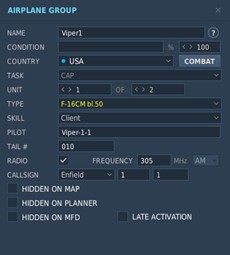
Using meaningful and consistent callsigns is recommended when preparing a mission for DCS AOC Tools, especially for operations involving multiple flights. Correct callsign configuration helps keep the aircraft groups defined in the DCS World mission consistent with the flight identification used throughout the generated ATO and the wider Combined Ops workflow.