
How DCS World Drawings Are Imported into Combined Ops
DCS World drawings created in the DCS World Mission Editor are imported into Combined Ops while preserving their original drawing types and properties. The main difference is how drawing visibility is organized in DCS AOC Tools and DCS Mission Planner.
In DCS AOC Tools, imported drawings are divided into Author, Common, and faction-specific drawing groups. The faction-specific content shown depends on the faction selected when the mission is opened.
In DCS Mission Planner, DCS World Common and faction-specific drawings are grouped into a single layer called Generic. This means Mission Planner users do not see which drawings are shared between factions or assigned to a specific faction. At the same time, mission designers can continue to use the Common drawing type in DCS World to create drawings that are intended to be visible to all users.
How to Create Custom Drawing Groups
Custom drawing groups can be created by adding a layer code to the beginning of a drawing name in the DCS World Mission Editor. Use the following format:
[LYR:drawings_group_name]
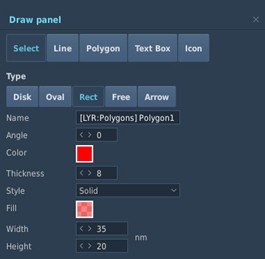
For example, adding [LYR:Polygons] to a drawing name creates a new drawing group called Polygons on Combined Ops maps. All imported drawings using the same layer code are placed in that drawing group.
After the drawing is imported, the [LYR:Polygons] code is hidden from the displayed drawing name.
Initial Points and Mission Targets
DCS World Initial Point objects are imported into DCS AOC Tools and DCS Mission Planner maps and displayed as red dots.
Initial Point objects can also be used to identify mission or campaign targets. To display an Initial Point as a target on Combined Ops maps, prepend the appropriate target code to the object name:
[TGT]for a general target.[SHIPTGT]for a maritime or ship target.
When one of these codes is used, the Initial Point is displayed as a white triangle on Combined Ops maps, allowing mission designers to use DCS World Initial Point objects as visual target references for operational planning.