
The mission start time is a fundamental setting in the DCS World Mission Editor when preparing a mission for DCS AOC Tools. AOC Tools uses the mission start time as the reference for calculating the times included in the Air Tasking Order (ATO) and other time-dependent operational information.
To configure the mission start time, open the Time and Weather section of the DCS World Mission Editor and set the desired mission date and start time.
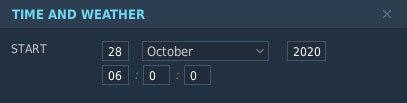
When the mission is imported into DCS AOC Tools, this setting provides the temporal reference used to calculate operational timings throughout the mission documentation. Correctly configuring the mission start time is therefore important for maintaining consistent timing between the DCS World mission, the ATO, and the other operational data generated by Combined Ops.