For DCS World missions that do not have a specific target, DCS AOC Tools can generate an AMSNLOC line in the Air Tasking Order (ATO). To provide this information, the mission location must be defined in the DCS World Mission Editor.
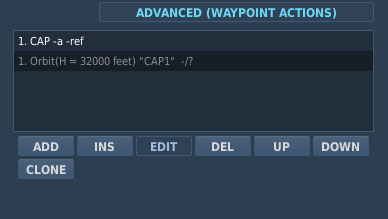
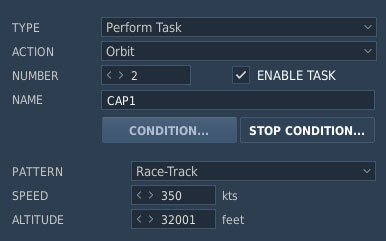
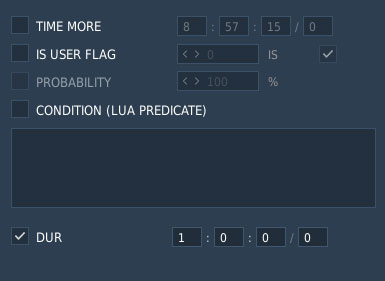
The mission location can be configured by using a waypoint action in the Mission Editor. Create a new waypoint action and configure an Orbit with a name and duration. DCS AOC Tools uses this information to identify the operational location and timing of the mission and include it in the generated ATO.
This method applies to mission types that operate in a defined area without a specific target, including CAP, CAS, SEAD, AWACS, tanker and other similar missions.
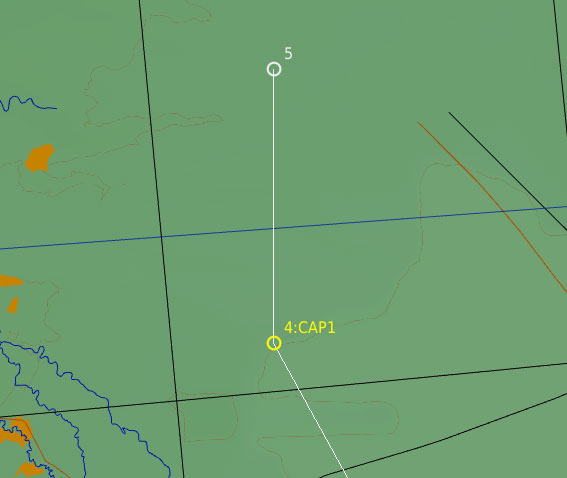
If a Race-Track orbit is used, the waypoint action must be configured on the first waypoint of the orbit so that DCS AOC Tools can correctly identify the mission location.
The resulting ATO information can include an AMSNLOC line such as:
AMSNLOC/280442ZOCT/280542ZOCT/CAP1/320/-/-//