
This page provides a comprehensive reference for the tactical symbology used throughout the Combined Ops environment. It covers the symbols and visual indicators used to represent tracks, units, air operations, command and control information, ATC elements, and other tactical objects displayed on the operational map.
The symbology is shared across different areas of the Combined Ops system, including C2 and ATC operations, allowing users to interpret tactical information consistently regardless of their role or operational position.
The reference includes symbols for friendly, unknown, and tracks of interest, as well as track responsibility, received information, previously identified tracks, filtered tracks, and other operational states. Additional sections will be added to document the complete Combined Ops symbology as the system evolves.
Use this page as the central Combined Ops map symbol reference when planning, conducting, or monitoring missions and air operations.
Track Symbols
| Symbol | Description | Shared |
|---|---|---|
 |
friendly or assumed friendly track | ID * |
 |
friendly or assumed friendly track previously identified | ID * |
 |
friendly or assumed friendly track of interest (own) | No |
 |
friendly or assumed friendly track of interest (own) hidden by filters | No |
 |
friendly or assumed friendly track of responsibility (own) | Yes, sent |
 |
friendly or assumed friendly track of responsibility and interest (own) | Partial ** |
 |
friendly or assumed friendly track of responsibility (own) hidden by filters | Partial ** |
 |
friendly or assumed friendly track of responsibility (other operator) | Yes, received |
 |
friendly or assumed friendly track of responsibility (other operator) and interest (own) | Partial ** |
 |
unknown or pending track | ID * |
 |
unknown or pending track of interest (own) | No |
 |
unknown or pending track of interest (own) hidden by filters | No |
 |
hostile or suspect track | No |
 |
hostile or suspect track of interest (own) | No |
 |
hostile or suspect track of interest (own) hidden by filters | No |
* System symbology: identification is shared among all connected operators, including when it is manually set by an individual operator.
** Combined symbology: some symbology elements are shared across all connected operators, while others are operator-specific. For example, groups of responsibility are shared, whereas tracks of interest are not; therefore, only part of the combined symbology is shared. See the individual symbology sections for detailed information on how each element is shared.
Identification Symbols
| Symbol | Description | Shared |
|---|---|---|
 |
friendly track | ID * |
 |
assumed friendly track | ID * |
 |
pending identification | ID * |
 |
unknown track | ID * |
 |
hostile track | ID * |
 |
suspect track | ID * |
* System symbology: identification is shared among all connected operators, including when it is manually set by an individual operator.
Tactical Symbology
| Symbol | Description | Shared |
|---|---|---|
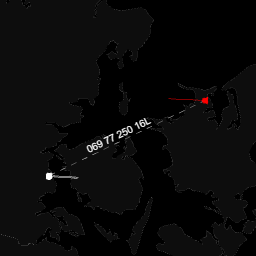 |
In addition to the free-hand BRAA measurement available using the middle mouse button, DCS Airspace allows controllers to enable Track-to-Track BRAA. This mode continuously displays the relationship between two selected tracks, connected by a dashed line with the corresponding BRAA information shown along the line. From the Map Options, the Aspect Angle display can also be configured to show either the numerical angle or the corresponding brevity word. |
No |
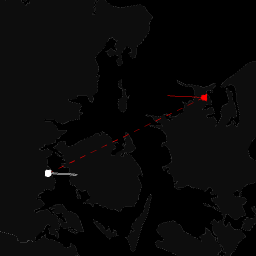 |
Targeted Line: when a friendly contact is designated as targeting an enemy contact, the two contacts are connected by a red dashed line. This symbology is shared across the system and displayed to all connected controllers. |
Yes |
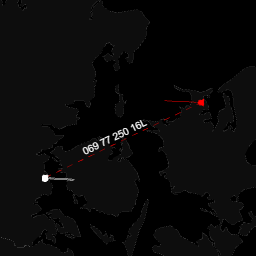 |
Combined symbology: when both the BRAA and Targeted Line functionalities are active, the two contacts are connected by a red line with the BRAA information displayed along the line. The targeted symbology (red line) is shared across the system and displayed to all connected controllers, while the BRAA information is controller-specific and is only displayed on the map of the controller who configured it. | Partial * |
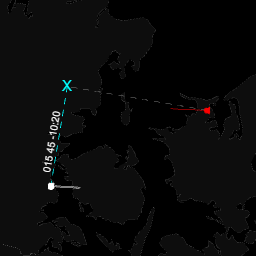 |
Cutoff symbology: when a friendly contact is selected and the Cutoff function is used to designate an enemy contact, an interception point is continuously calculated. The following symbology is displayed until the Cutoff function is deactivated:
|
No |
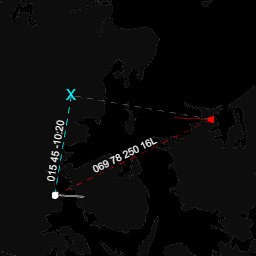 |
Combined symbology: when Track-to-Track BRAA, Targeted Line, and Cutoff are active simultaneously, all three symbologies are displayed on the map at the same time. Each symbology retains its own visual representation and behavior, allowing the corresponding tactical information to be displayed concurrently. | Partial * |
* Combined symbology: some symbology elements are shared across all connected operators, while others are operator-specific. See the individual symbology sections for detailed information on how each element is shared.